Great question—this is one of those everyday miracles we use constantly without thinking about it 🙂
Let’s break how an Android phone’s touch pad (touchscreen) works, step by step, in clear and simple English, and then connect it to performance and responsiveness.
1. What type of touch pad does Android use?
Almost all Android smartphones use a capacitive touchscreen, not resistive.
Capacitive touchscreens work by sensing electrical changes, not pressure.
That’s why:
- Light touch works
- Gloves usually don’t
- Fingernails don’t register well
- Water can confuse the screen
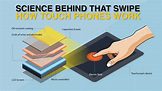
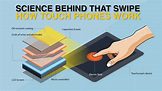
2. Basic structure of an Android touchscreen
From top to bottom, the screen has several layers:
- Protective glass (Gorilla Glass, etc.)
- Transparent conductive layer (usually Indium Tin Oxide – ITO)
- Touch sensor grid (rows and columns of electrodes)
- Display panel (LCD or AMOLED)
- Touch controller IC (chip that interprets touch)
The magic happens mainly in layers 2, 3, and the controller chip.
What happens when your finger touches the screen? ILLUSTRTION
3. What happens when your finger touches the screen?
Step-by-step reaction
Step 1: Electrical field exists on the screen
- The conductive layer maintains a uniform electrostatic field
- Small electric charges flow through the grid continuously
Step 2: Your finger approaches the screen
- Human skin is conductive (contains water and salts)
- Your finger behaves like a capacitor
Step 3: Capacitance changes
- When your finger touches the glass:
- It draws a tiny amount of electric charge
- This causes a local disturbance in capacitance
- The touch sensor detects:
- Where the disturbance happened
- How strong it is
Step 4: Touch controller processes data
- The touch controller chip:
- Scans the grid thousands of times per second
- Converts analog signals into digital coordinates (X, Y)
Example:
Touch detected at X = 540, Y = 1230
4. How does Android OS understand your touch?
Once the controller detects a touch:
- It sends data to the kernel driver
- Android’s Input System interprets the event:
- Touch down
- Touch move
- Touch up
- The event is passed to:
- The active app
- The UI framework
- The app reacts:
- Scroll
- Tap
- Zoom
- Type
This entire chain happens in milliseconds.
5. Multi-touch: How pinch and zoom work
Android screens support multi-touch using mutual capacitance.
How it works:
- Each intersection of rows and columns is measured
- Multiple disturbances can be tracked simultaneously
- The system identifies:
- Number of fingers
- Direction
- Speed
- Gesture pattern
Example:
- Two fingers moving apart → Zoom in
- Two fingers moving together → Zoom out
6. Why touch performance feels fast or slo
Touch performance depends on several factors:
1. Touch sampling rate
- Measured in Hz (120Hz, 240Hz, etc.)
- Higher rate = faster touch detection
2. Display refresh rate
- 60Hz, 90Hz, 120Hz
- Higher refresh = smoother visual response
3. Touch controller quality
- Better IC = faster signal processing
- Cheaper phones may have latency
4. CPU & GPU speed
- Touch is processed by software after detection
- Slow processor = delayed response
5. Software optimization
- Android UI thread load
- Background apps
- Thermal throttling
7. Why water, gloves, or dirt affect touch
Water:
- Conducts electricity
- Creates false capacitance changes
Gloves:
- Insulate your finger
- No electrical interaction
Dirt or oil:
- Interferes with the electric field
- Reduces accuracy
That’s why screens sometimes act “ghosty” in rain.
8. What happens during scrolling or gaming?
When you scroll or play games:
- Touch input is sampled continuously
- Motion prediction algorithms estimate finger movement
- Frames are rendered ahead to reduce lag
- Android uses touch latency reduction techniques
In gaming phones:
- Touch sampling up to 360Hz
- Special firmware for faster response
9. Why cracked screens still sometimes work
Even if glass is cracked:
- The conductive layer may still be intact
- Capacitance detection continues
- Accuracy reduces, but touch works
Once the conductive layer breaks → touch fails.
10. In simple words
Your finger doesn’t “press” the screen.
It disturbs an invisible electric field, and the phone instantly calculates where and how you touched.
That tiny disturbance → electrical signal → software event → app action.
All of this happens faster than your brain notices.